 Source Glance
Flat lists, grouped your way
One list across all your accounts, grouped by project, platform or organization, in the window, the top bar and the widgets. Each group is a plain heading with its count.
GNOME Shell extension · Ubuntu 24.04+
Source Glance puts what's assigned to you on GitHub and GitLab, across all your accounts and self-hosted instances, in the top bar, on your desktop and in its own searchable window. Comment, close, relabel and move cards without opening a browser.
New in this release
One list across all your accounts, grouped by project, platform or organization, in the window, the top bar and the widgets. Each group is a plain heading with its count.
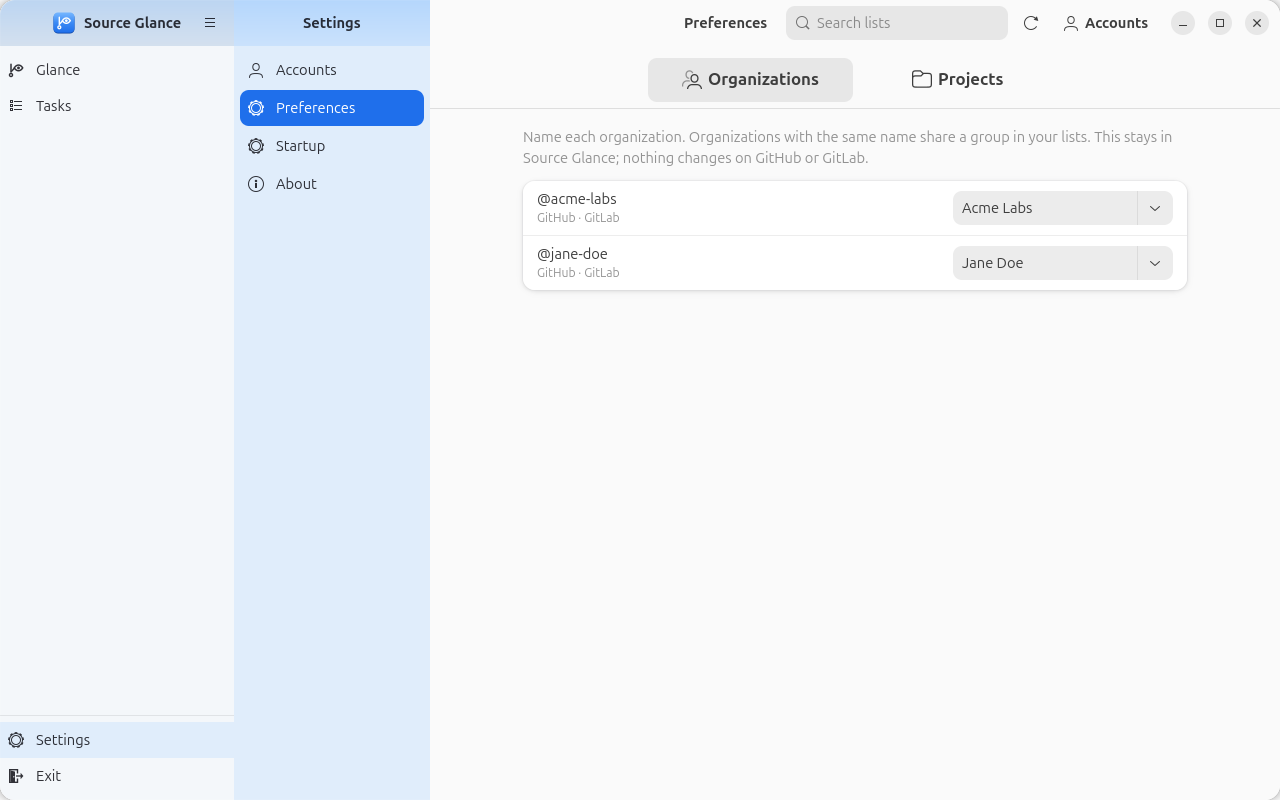
Name an organization once, even across GitHub and GitLab, and group your repositories into projects: rename in place, drag to move, disband. It all stays in Source Glance.
Per account: widen or limit what the sign-in can reach on GitHub, choose the repositories you watch, search public ones to add, and hide the boards you don't need.
Accounts, Preferences, Startup and About each have a page. The Accounts card and a Top bar switch are one click away.
Short loops drawn from the real app. Pick one, or let them play.
All Tasks pulls every issue, pull request and project card assigned to you, from every GitHub and GitLab account, into one list. Filter by kind, account, label or person, and the list narrows as you click.
#42 Fix the login redirectexample/web-app
#88 New onboarding screensexample/web-app
!19 Retry on rate limitsacme/api
Plan the Q3 roadmapTeam board · In progress
#12 Crash when offlineacme/api
#9 Document the setupacme/docs
Press Comment on any item and a Markdown box opens right under it. Write, press Ctrl+Enter, and it's posted; the box tucks itself away and the count goes up.
#37 Dark mode for settingsBoard: Todo
#42 Fix the login redirectBoard: In progress
2#51 Remember the last tabBoard: Done
Click a title and its preview docks on the right: the description and its comments, rendered from Markdown with headings, checklists, code and links. Edit the description or add a comment from there.
#88 New onboarding screensexample/web-app · review requested
!19 Retry on rate limitsacme/api
#90 Faster searchexample/web-app
Three screens replace the old wizard. No new settings.
npm run screenshots1 comment
Project Boards lists the draft cards on your GitHub project boards, board by board, with their status. Move one on and the board on GitHub is up to date for everyone. Issues and pull requests on a board get the same button in their own lists.
Write the release notesTodo
Plan the Q3 roadmapIn progress
Book the design reviewDone
Summary, Issues, Pull requests, Project Boards and widgets you make yourself sit on your desktop, Small, Medium or Large. Arrange them in the window or drag them on the desktop; they update with the top bar, so a glance between windows is enough.
Two parts of Source Glance you can click through right on this page.
Show Issues, Pull requests and Project Boards as one tinted group or as tabs, each with its live count. Turn off the lists you don't need. Click a button to open its menu, one flat list grouped the way you choose.
All Tasks gathers your issues, pull requests and project cards from every account. Pick a list in the sidebar, narrow it by label, or search by title, repository or number.
Screenshots made with invented accounts and items.
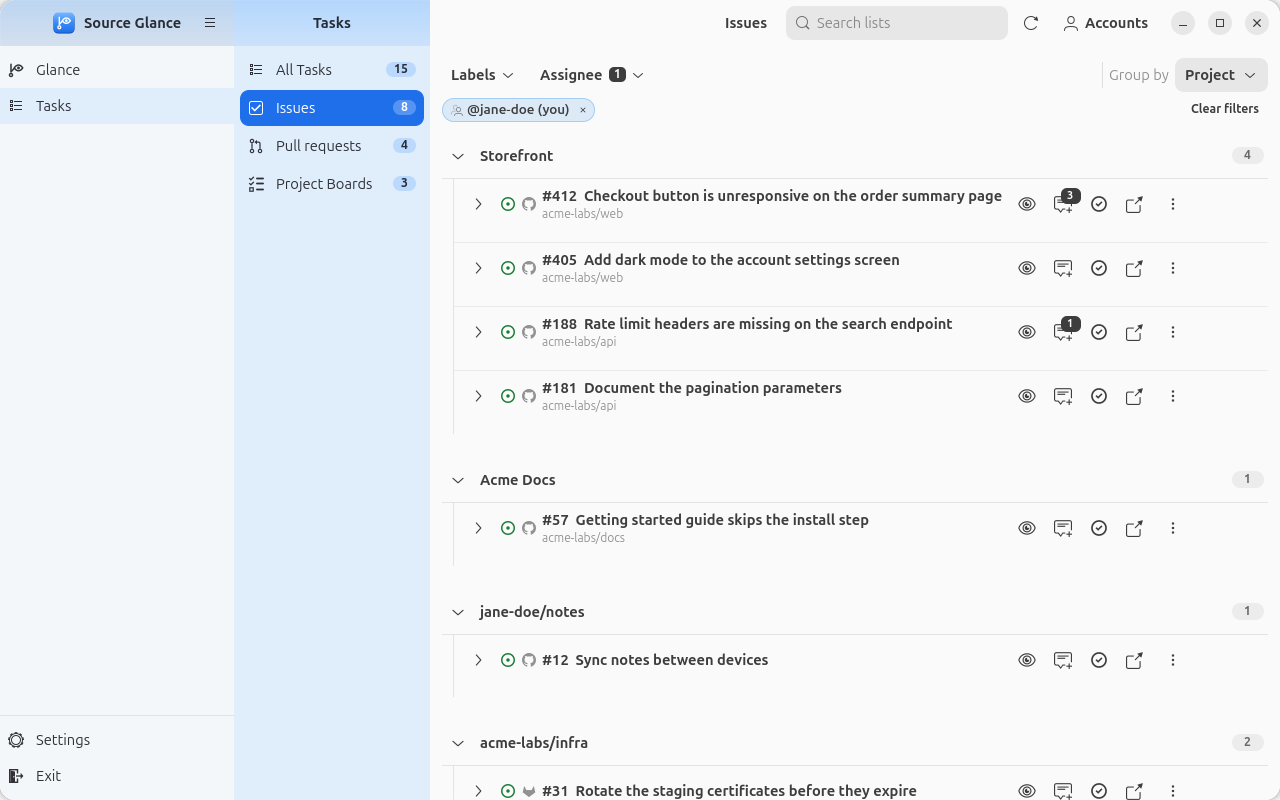
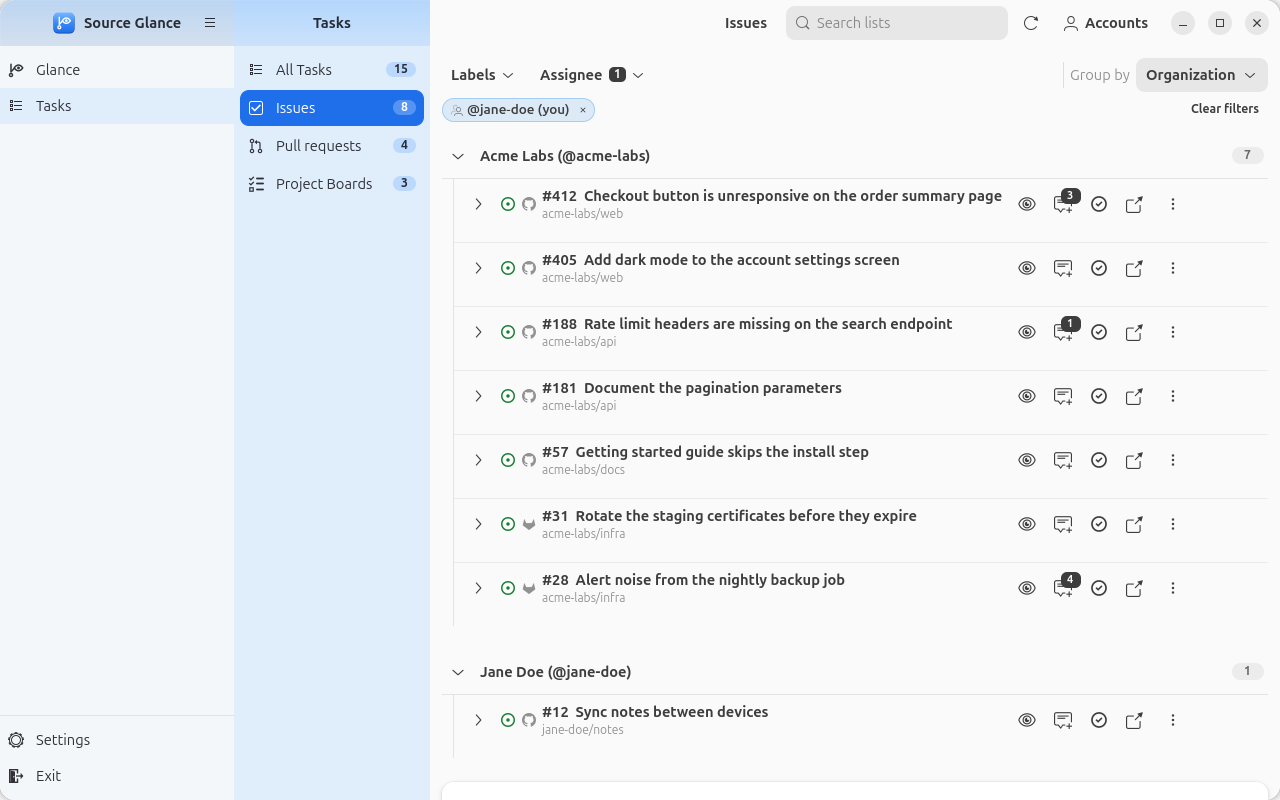
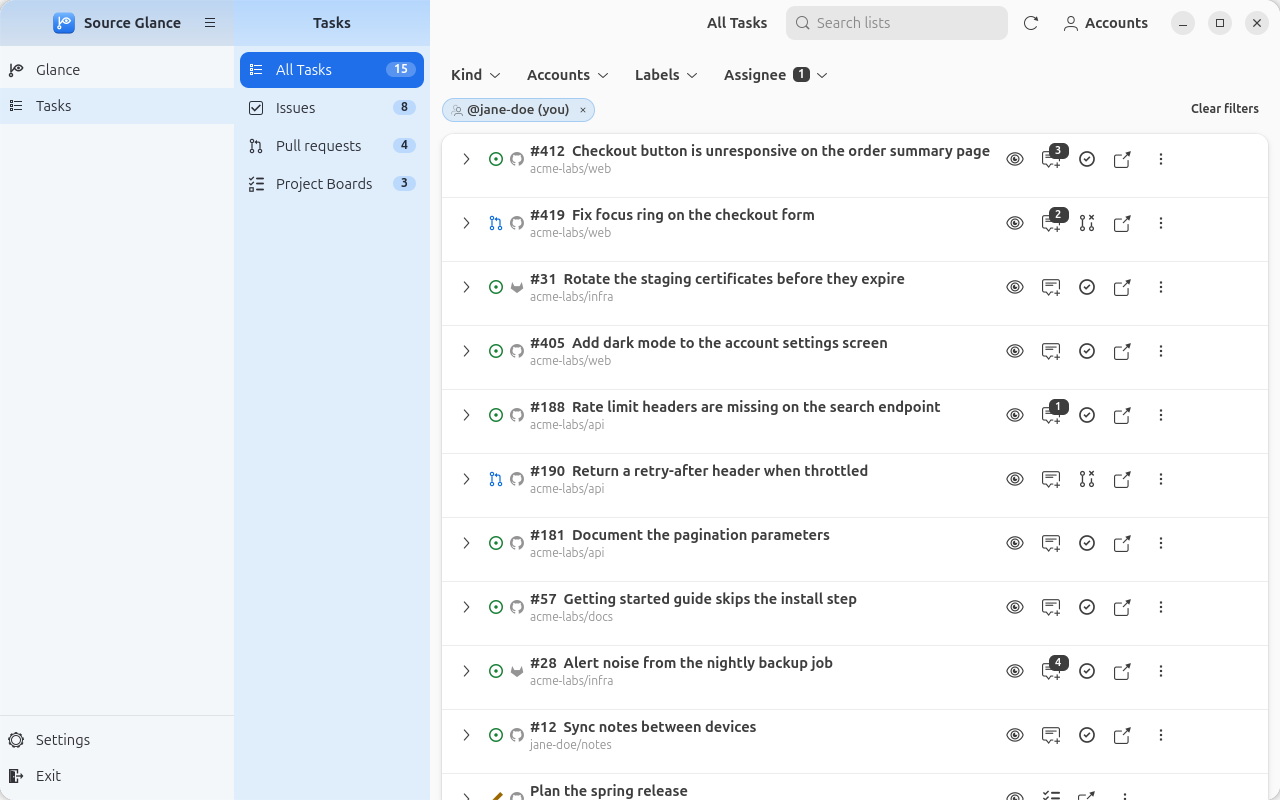
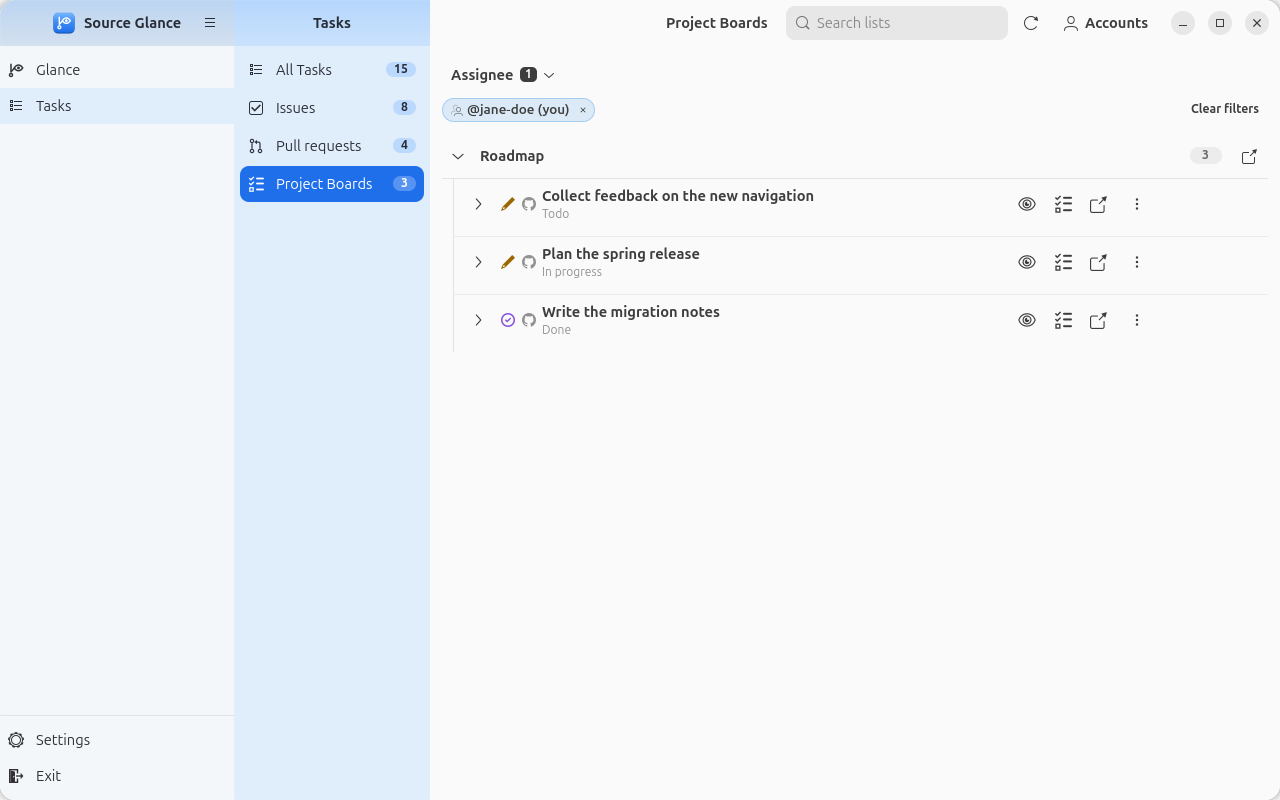
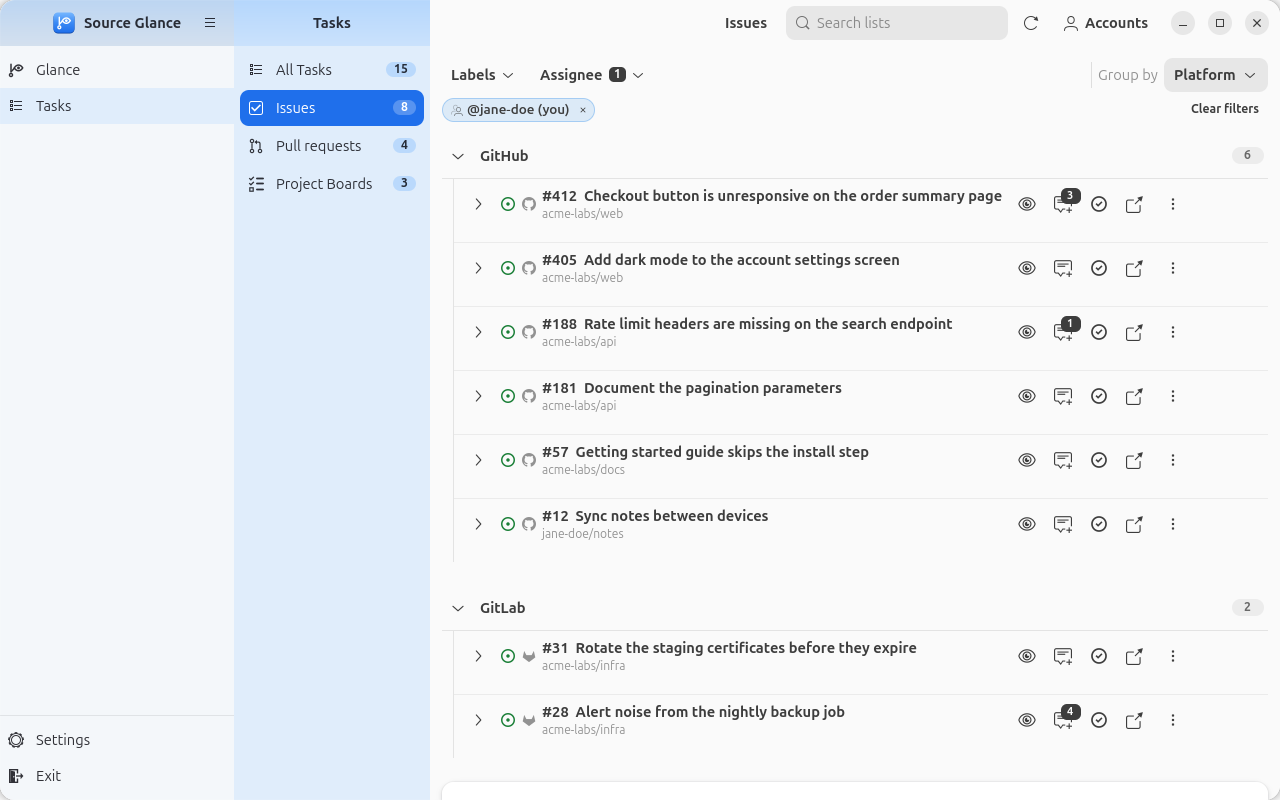
Issues, Pull requests and Project Boards as one tinted group or as tabs, each with its live count. One flat list across your accounts, grouped by project, platform or organization; closed items are counted at the bottom. Menus keep a steady width sized to your screen.
Comment, close or reopen, edit assignees, labels and custom fields, and move items between statuses on your project boards, from the top bar or the window. Comment opens a box right under the item; the ⋮ menu copies references and links.
Add several GitHub and GitLab accounts; their items show together in one list. A guided setup connects GitHub Enterprise Server and GitLab self-managed, and counts add up across them all.
A slim sidebar: Glance for your widgets and top bar, Tasks for All Tasks, Issues, Pull requests and Project Boards, and Settings with a page for Accounts, Preferences, Startup and About, each opening its menu right beside it. Click a title to preview it, Markdown rendered and comments as a feed. A red ! on Refresh says what failed and how to fix it.
Summary, Issues, Pull requests and Project Boards cards, or ones you make from filters, on your desktop. Arrange them in the window, set each one's size, opacity and where they sit, and set the wallpaper they're made for in one click.
On github.com, sign in through a GitHub App limited to issues, pull requests and projects: no code access. Tokens stay in the GNOME keyring, and self-hosted instances need HTTPS unless they're on your local network.
One box, always on the right of the window's title bar, filters issues, pull requests and project items by title, repo, number, label or person, with match counts. Clear it to see everything again.
A notification at login says when a new version is out, with what's new. Install downloads the new Setup, checks its SHA-256 checksum and updates Source Glance, with no need to log out.
Apache 2.0 licensed. Public repositories you don't own show up without any setup. Report an issue or contribute.
Source Glance Setup for Intel/AMD works on most PCs; there's also a build for ARM.
In Files, right-click the download, choose Properties and turn on Executable as Program.
Double-click it and follow the steps. Run it again any time to repair or remove Source Glance.
Download SHA256SUMS into the same folder and run:
sha256sum --check --ignore-missing SHA256SUMSEvery release is built by GitHub Actions with a provenance attestation. See the install guide.
Needs GNOME Shell 46–50 (Ubuntu 24.04 or newer) and a GitHub or GitLab account.
One Setup file does it all: install, update, repair or remove. Run the latest Setup and it updates the Source Glance you have in place, keeping your settings and sign-ins. The new version starts right away, with no need to log out.
Easier still: when a newer version is out, a notification says so when you log in, with short release notes; Install starts the update. The window also shows Update available in its title bar. Click it and Source Glance downloads the new Setup, checks it against the release's SHA-256 checksums and opens it; when Setup finishes, the window reopens on the new version. Turn the check off in Settings. (Coming from v0.2.0 or earlier, log out once after updating.)
For ARM PCs: Setup for ARM (aarch64)
Source Glance is open source. Found a bug or have an idea? Tell us, or fork the repository and send a pull request.
make lint and make test.main.New here? Read the contributing guide or pick a good first issue.
Looks great. Ship it 🚀